I cannot seem to find any information on the pins for the Chatter (specifically 2.0) screen, or even what the screen driver is.
1 Like
If it makes it easier, a different library could be used instead of TFT_eSPI.
1 Like
Hi @SmartDude,
you can find the schematics with all the information attached.
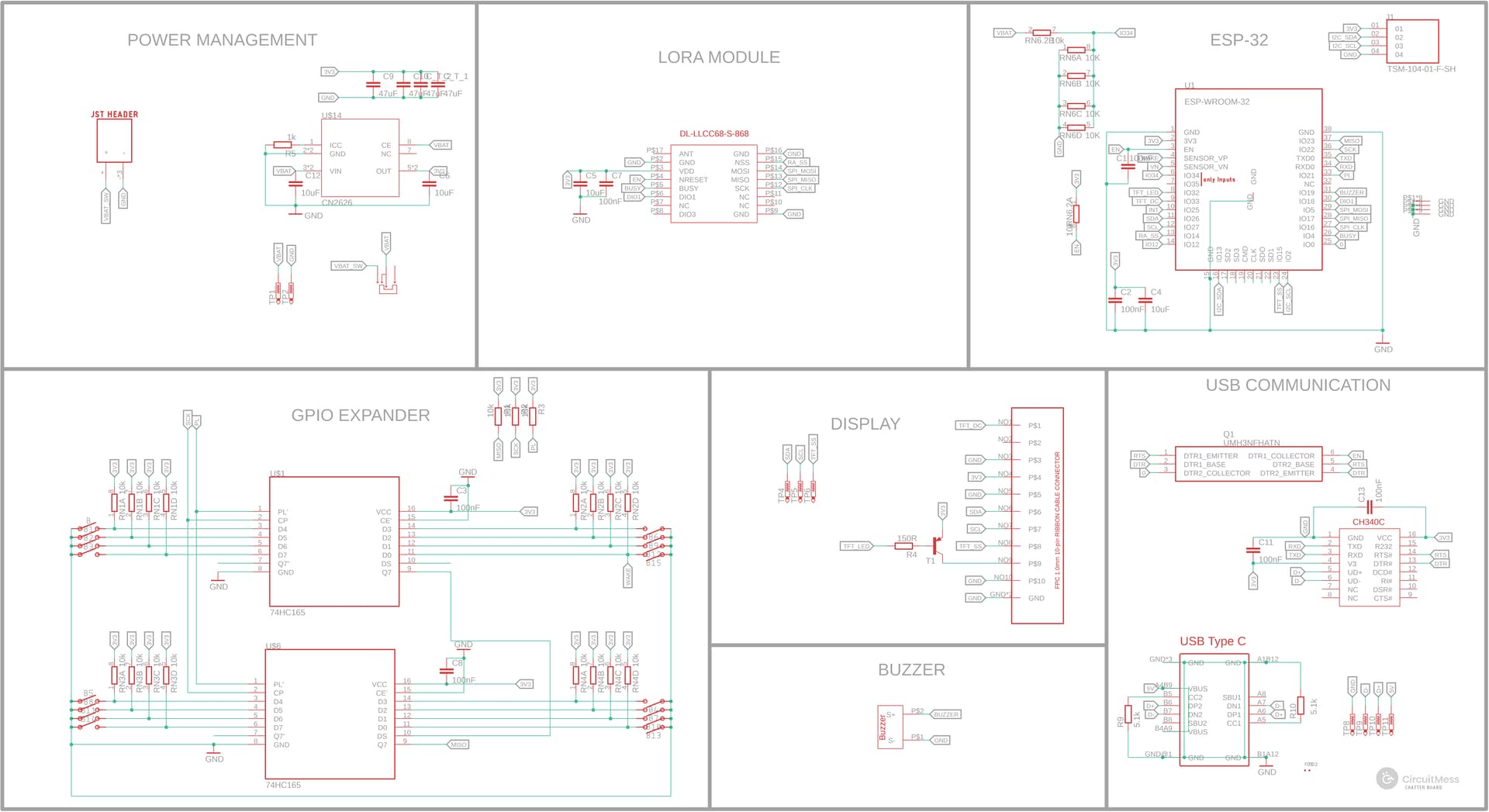
Also, the libraries for Chatter 2.0 can be found here:
Best,
Monika
I looked for the same thing and took me a while to find, but I think I have a spoiler to provide, this is from the Arduino board definitions for the chatter.
chatter:
chatter.build.defines= -DLOVYAN_PANEL=Panel_ST7735S -DLOVYAN_FREQ=27000000 -DLOVYAN_WIDTH=128 -DLOVYAN_HEIGHT=160 -DLOVYAN_MISO=-1 -DLOVYAN_MOSI=26 -DLOVYAN_SCK=27 -DLOVYAN_CS=-1 -DLOVYAN_DC=33 -DLOVYAN_RST=15
I’m taking this to mean it’s ST7735S with 160x128 resolution (128x160 rotated)
chatter2:
chatter2.build.defines=DLOVYAN_PANEL=Panel_ST7735S -DLOVYAN_FREQ=27000000 -DLOVYAN_WIDTH=128 -DLOVYAN_HEIGHT=160 -DLOVYAN_MISO=-1 -DLOVYAN_MOSI=26 -DLOVYAN_SCK=27 -DLOVYAN_CS=-1 -DLOVYAN_DC=33 -DLOVYAN_RST=15
apparently no difference
I got Chatter working with TFT_eSPI today, here was the working tft_setup.h
#define ST7735_DRIVER

#define TFT_WIDTH  128
#define TFT_HEIGHT 160

#define TFT_MISO -1
#define TFT_MOSI 26
#define TFT_SCLK 27
#define TFT_CS    23  // Chip select control pin
#define TFT_DC    33  // Data Command control pin
#define TFT_RST   -1  // Reset pin (could connect to RST pin)

#define LOAD_GLCD   // Font 1. Original Adafruit 8 pixel font needs ~1820 bytes in FLASH
#define LOAD_FONT2  // Font 2. Small 16 pixel high font, needs ~3534 bytes in FLASH, 96 characters
#define LOAD_FONT4  // Font 4. Medium 26 pixel high font, needs ~5848 bytes in FLASH, 96 characters
#define LOAD_FONT6  // Font 6. Large 48 pixel font, needs ~2666 bytes in FLASH, only characters 1234567890:-.apm
#define LOAD_FONT7  // Font 7. 7 segment 48 pixel font, needs ~2438 bytes in FLASH, only characters 1234567890:.
#define LOAD_FONT8  // Font 8. Large 75 pixel font needs ~3256 bytes in FLASH, only characters 1234567890:-.
//#define LOAD_FONT8N // Font 8. Alternative to Font 8 above, slightly narrower, so 3 digits fit a 160 pixel TFT
#define LOAD_GFXFF  // FreeFonts. Include access to the 48 Adafruit_GFX free fonts FF1 to FF48 and custom fonts

#define SMOOTH_FONT


#define SPI_FREQUENCY  27000000
I have Chatter not Chatter2, but I think they’re the same.
When I ran this as a test, the screen rotation was 90° to the right, so tft.setRotation(3) was necessary to get the text upright.
Also I believe the backlight is on pin 32 and it’s active LOW, so in your setup:
  pinMode(32, OUTPUT); // BACKLIGHT
  digitalWrite(32, LOW);
Hey casascius, do you have any test like hello world code that show how to draw on the screen using ST7735_DRIVER and esPI-FTF please? many thanks in advance
1 Like
Thank you for reaching out! We love seeing our community dive deep into the code and experiment with custom screen drawings.
To help point you in the right direction, here are a few technical details about how the Chatter display operates:
- Current Display Library: In our latest release, Chatter’s firmware actually uses the LovyanGFX library under the hood, specifically version 0.4.1.
-
Dependency Chain: If you want to trace how it all connects, the library dependency chain goes like this:
Chatter-Firmware
Chatter-Library CircuitOS library LovyanGFX library. - TFT_eSPI Usage: If you are specifically looking to use TFT_eSPI, the best place to find a “hello world” or starter code would be directly in their official GitHub repository. They have a variety of great examples to help you get started with basic screen drawing!
- Hardware Mapping: To help you map out the pins and understand the hardware connections, you can check out the schematics for the Chatter devices on our resources page here: Chatter 2.0 Build Guide
We hope this helps you get your code up and running! Please let us know if you have any other questions while you’re tinkering. Happy coding!
CircuitMess Team
1 Like
Great, thanks. Much appreciated.
BTW, i wanted to code in baremetal or without much bloatware, and code plain vanilla without the use any citcuitmess or chatter libs… the device uses an ESP32 and i am trying to workout how to do btn presses and screen draw… The Hello world does not empty and so i am struggling to find a basic example code… ino. chatgpt and Claud code really mess lead me into wrong directions… any help would be greatly appreciated.
Studying our Chatter firmware and library on GitHub is the best way to see the pin mappings and logic for your custom code. For a more advanced, bare metal experience, we recommend using ESP-IDF (GitHub - espressif/esp-idf: Espressif IoT Development Framework. Official development framework for Espressif SoCs. · GitHub).
Please note that we don’t provide custom code, writing services for specific user requests, but our source code should serve as a great map for your project. Happy hacking!
Closely related: is it possible to do a similar/same thing with the wheelson ESP and screen. By reading the GitHub I found out its also ST7735 but wasn’t able to do much
Yes, the exact same principle applies to the Wheelson! To make things a lot easier, you can simply use the Wheelson-Library. The display initialization, button inputs, and all other basic hardware configurations are already written and set up for you there.
However, if you want to build everything completely from scratch, you can definitely study the Wheelson-Library and the official Wheelson firmware and use them as a starting point to see exactly how we handled the ST7735 screen and the ESP. You can check out the repository right here: GitHub - CircuitMess/Wheelson-Library · GitHub
Have fun tinkering, and let us know how it goes!
CircuitMess Team
1 Like